- Published on
Debugging Nuxt 3 Memory Leak
Introduction
This is a write-up of a memory leak I debugged in a Nuxt 3 application during a freelance engagement. I find these kinds of notes useful to come back to, and maybe someone else will too.
TL;DR: the SSR application had an unbounded memory leak caused by the Vue Router instance retaining state across server-side requests. We didn't catch it for a long time because we had no profiling in place — we were flying blind. When we finally added observability, the problem was obvious.
This post covers what happened, why it was hard to find, and what we put in place so it won't happen again.
Background: How Nuxt 3 SSR Memory Works
To understand the leak, it helps to understand how memory is managed in a server-side rendered Node.js application.
In a browser, each tab has its own isolated JavaScript context. Memory from one session doesn't bleed into another. On a server, it's different: a single long-running Node.js process handles thousands of requests sequentially. If any object retains a reference after a request finishes, that object stays in memory indefinitely — the garbage collector can't reclaim it because something still holds a reference to it.
In a healthy SSR application, a memory profile should look like a sawtooth wave:
- Request arrives → memory goes up as objects are allocated
- Request finishes → memory drops back to baseline as the GC reclaims them
If memory goes up but never fully comes down, something is holding a reference it shouldn't. This pattern is called a memory leak, and it compounds over time: each request leaves a little more behind, and the total grows without bound until the process exhausts the container's memory limit.
Nuxt 3's SSR is built on top of Nitro, which uses a server plugin system to hook into the request/response lifecycle. The Vue Router is initialized per-request but, under certain conditions, can retain references to request-specific data past the end of the response.
Root Cause
The leak originated in how the Vue Router instance was handled at the end of each server-side render.
When Nuxt processes a request server-side, it creates a router instance to resolve the current route. In our setup, this instance was not being explicitly dereferenced after the response was sent. The event context object — which lives slightly longer than the response itself — held onto the router, which in turn held onto route-specific reactive state.
The router instance is a singleton per request context, but if the context is not cleaned up, it leaks. Over time:
Request 1 → router instance created → response sent → context retains router reference
Request 2 → new router instance created → same thing happens
...
Request N → GC has no way to collect any of these → heap grows without bound
This is exactly what showed up in Pyroscope once we added profiling:
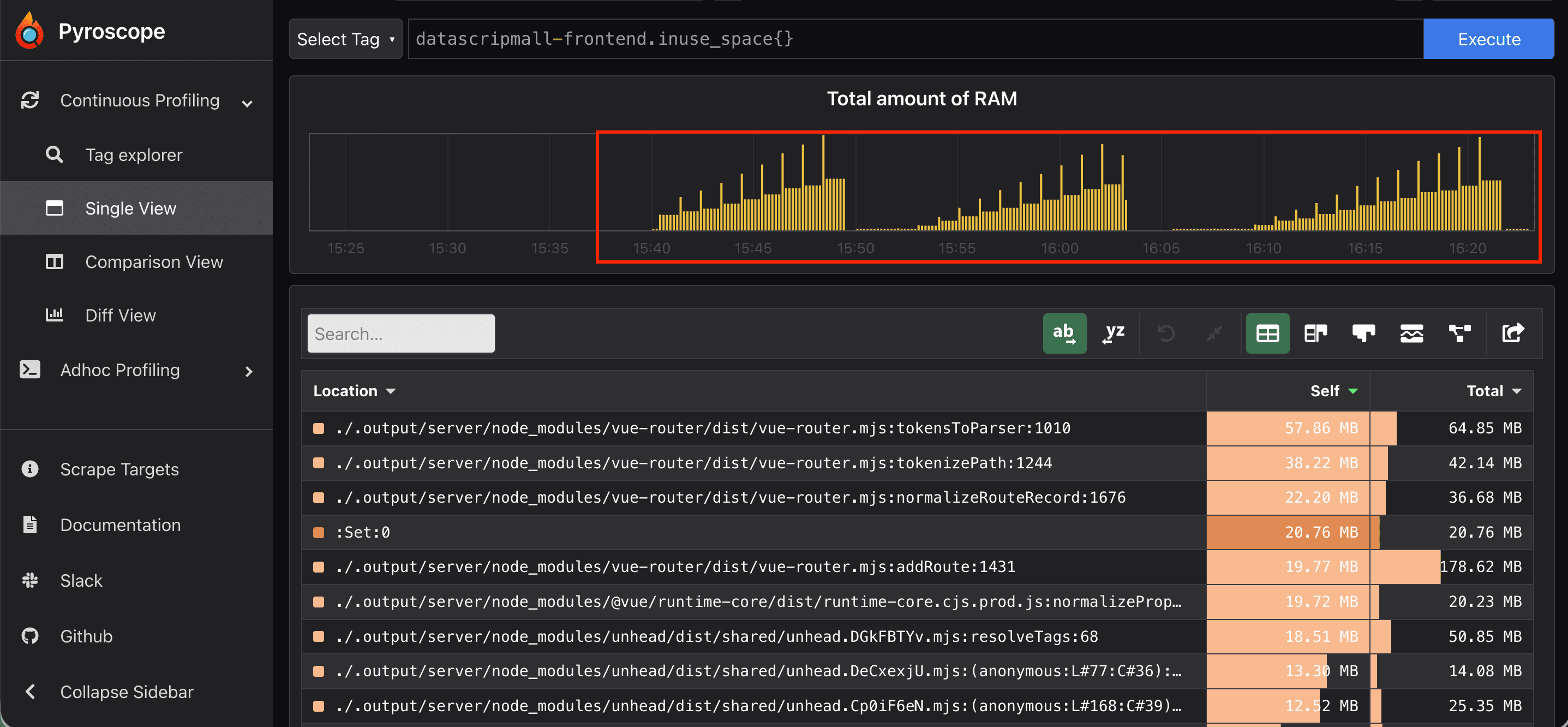
The "staircase" pattern. Each step is a batch of requests. Memory goes up and never returns to baseline. In a healthy application, it would form a sawtooth — up and down, up and down.
Why Was This Hard to Find?
We were guessing without data
Our first reaction was the same one a lot of teams default to: throw more resources at it.
We doubled the container memory limit from 2GB to 4GB. Memory still hit the ceiling, just later. We raised it to 6GB. The slope was identical — just shifted right on the timeline. More RAM didn't help because the leak was proportional to traffic, not to some fixed overhead. Every additional request made it worse by the same amount.
The fundamental problem was that we didn't know what was leaking. Without that information, every "fix" was a guess.
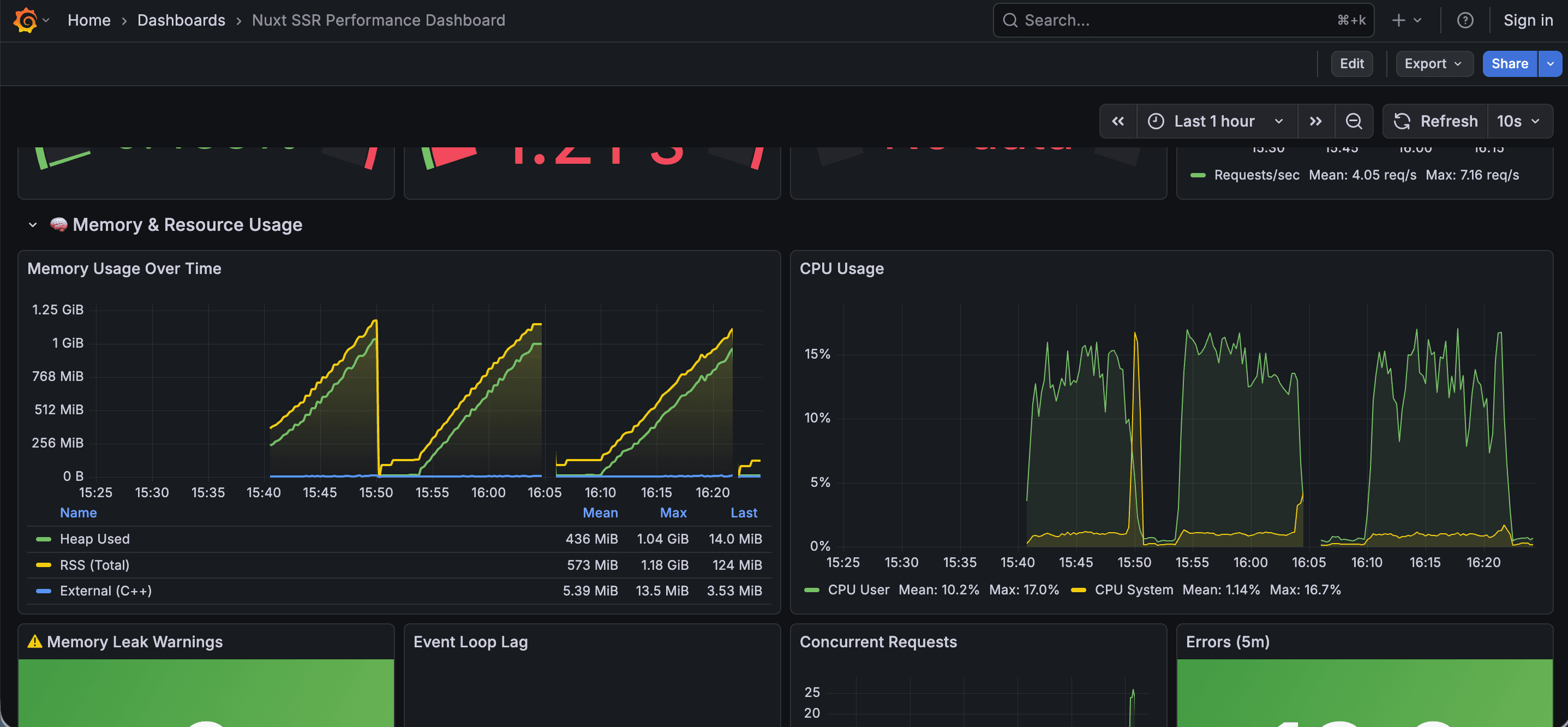
The metric we had (total memory) told us the leak existed. It couldn't tell us where.
The leak was slow and invisible without a profiler
The growth was gradual enough that it wasn't immediately alarming — a few MB per minute. It only became a crisis after it accumulated for 2-3 hours. A single request looked fine in isolation. You needed a time-series view of allocations, not just a snapshot, to see the pattern.
Node.js doesn't surface this kind of leak through normal logging. There's no "you are retaining N objects from past requests" warning. The heap just grows silently until the container hits its memory limit.
We had no profiling baseline
We had no Pyroscope, no heap profiling, no flamegraphs. We were relying on a single "memory usage" metric that told us the symptom but not the cause. Without a profiler, the root cause was invisible.
How We Fixed It
Once we added Pyroscope, the staircase pattern pointed directly to the router. The fix was straightforward once we understood the problem.
The Nitro cleanup plugin
We added a Nitro server plugin to explicitly dereference the router instance after each response is sent:
// server/plugins/cleanup.ts
export default defineNitroPlugin((nitroApp) => {
  nitroApp.hooks.hook('render:response', (response, { event }) => {
    if (event.context.router) {
      event.context.router.currentRoute.value = null
      event.context.router = null
    }
  })
})
The render:response hook fires after the HTML has been sent to the client. By nullifying the router reference at that point, we break the reference chain and allow the GC to reclaim the memory.
This single file fixed the staircase. After deploying it, the memory profile changed immediately:
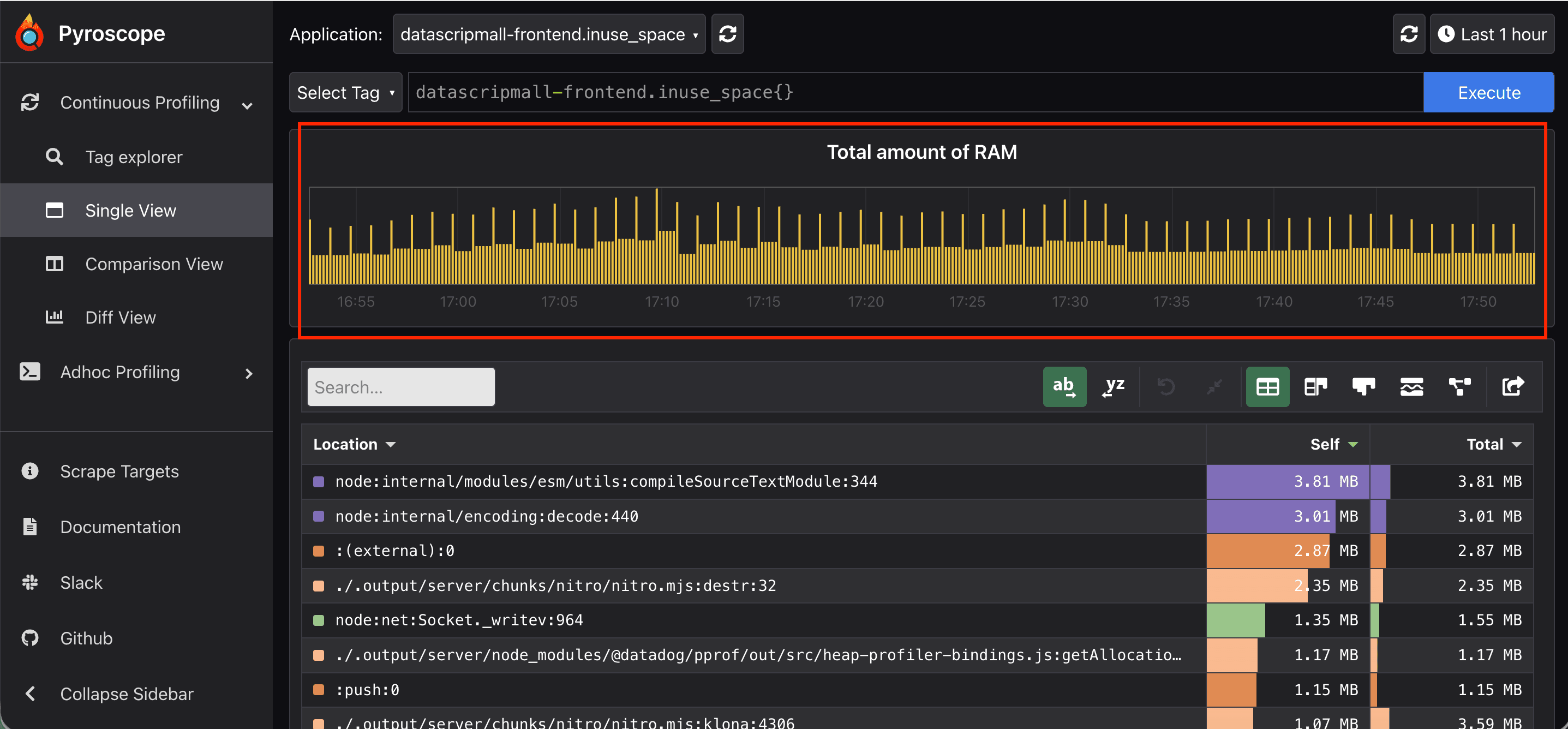
The profile is now a sawtooth: memory goes up per request and comes straight back down. The GC is working as expected.
Reducing unnecessary SSR load with SWR caching
With the leak fixed, we also addressed a separate inefficiency we spotted during the investigation: we were running full server-side renders for product pages on every request, even for content that hadn't changed.
We enabled Stale-While-Revalidate (SWR) caching on those routes:
// server/routes/products/[id].ts
export default defineCachedEventHandler(
  async (event) => {
    const id = getRouterParam(event, 'id')
    return await fetchProduct(id)
  },
  {
    maxAge: 60 * 5, // Cache for 5 minutes
    swr: true, // Serve stale while updating in background
  }
)
This reduced SSR load significantly. Cached responses don't go through the full render path, so they don't allocate the same objects. It's not a replacement for the leak fix — just a sensible optimization we should have done earlier.
Why Wasn't This Caught Earlier?
No profiling in the stack
We had metrics (memory over time) but no profiling (which code is allocating that memory). These are different tools. Metrics tell you that something is wrong. Profiling tells you what.
Without a profiler, it was genuinely impossible to identify the root cause. We could observe the symptom from the outside but couldn't see inside the process to understand what was causing it.
We confused "more resources" with "fixing the problem"
Scaling up the container limit was a reasonable first step — it confirmed the leak was memory-related and bought time. But we held onto that approach for too long. It was addressing the symptom, not the cause.
No load test in the pipeline
The leak was slow enough that it didn't appear in short-lived environments. A quick smoke test against a staging server wouldn't surface it — you needed sustained traffic over at least an hour. We had no automated soak test that would have exposed the pattern before it reached production.
The root cause isn't obvious from documentation
The Nuxt documentation doesn't explicitly warn about router lifecycle and SSR memory. The pattern of "something retains state across requests" is a common class of Node.js SSR bug, but it's not something you'd find by reading about how to set up routing. You find it by looking at a flamegraph.
Remediation
Immediate fixes applied
Added continuous profiling
Pyroscope is now running in production alongside Grafana. We have a dashboard that shows memory per request alongside a link to the Pyroscope query for the same time window. If memory trends upward again, we can trace it to the specific function within minutes rather than days.
Added the cleanup plugin to our Nuxt base template
The Nitro cleanup plugin is now part of our internal project template. Any new Nuxt project we start will have it by default.