- Published on
Leveraging Observability Practices in Software Development
Introduction
I've been playing around with observability tools recently. It's one of those things everyone says you need, but I wanted to see why.
So I decided to build something and break it on purpose. Made a simple cottage booking app and intentionally created some database lock issues to see if observability could actually help me debug the mess. I wanted to know: would I be able to see what was happening in real-time, or would I still be stuck grep-ing through logs like before?
Used OpenTelemetry, Prometheus, Grafana, and Loki - the usual suspects for metrics, traces, and logs.
Code's all here if you want to see: github.com/morifky/cottage-booking-app
The Setup
OpenTelemetry does most of the heavy lifting. I honestly expected a config nightmare—I'd heard horror stories about instrumentation being a pain—but it automatically instrumented my GORM calls and HTTP requests. Pretty neat.
The whole setup took me about three hours on a Saturday morning. Most of that was reading documentation and figuring out which exporters I needed. The OpenTelemetry docs are... dense. I probably read the same "getting started" page four times before it clicked.
For metrics, I'm tracking request times, booking counts, database stuff. You know, the usual dashboard lines that go up when things go down.
Logs go through Zap to Loki. The nice thing is everything connects with trace IDs, so you can jump from a log line to see the full request flow. This turned out to be way more useful than I expected.
How it works
App sends everything to the OpenTelemetry Collector, which routes metrics to Prometheus, logs to Loki, traces to Tempo. Grafana pulls it all together.
I spent probably an hour just getting the collector config right. Kept getting "connection refused" errors until I realized I had the wrong port numbers. Classic.
                                +-----------------+
                                |     Grafana     |
                                | (Visualization) |
                                +--+----+---+----+-+
                                   ^    ^   ^    ^
                                   |    |   |    |
+-----------------------+      +---+----+---+----+---+      +-----------------+
| Cottage Booking App   |----->|  OpenTelemetry    |----->|   Prometheus    |
| (Instrumented w/SDK)  |      |     Collector     |      |    (Metrics)    |
+-----------------------+      +-------------------+      +-----------------+
                                          |
                                          +--------------->|      Loki       |
                                          |                |      (Logs)     |
                                          |                +-----------------+
                                          |
                                          +--------------->|  Grafana Tempo  |
                                                           |     (Traces)    |
                                                           +-----------------+
Breaking things
Here's the fun part - I wrote some code to create database lock contention on purpose.
The idea was simple: what if one request grabs a table lock and holds it for a while? What happens to other requests that need the same table? Without observability, you'd just see timeouts. With it, you should be able to see exactly where things are stuck.
I was curious if I'd actually be able to pinpoint the problem, or if I'd still be guessing.
func (br *BookingRepository) SaveWithLock(ctx context.Context, booking *models.Booking, holdDuration time.Duration) error {
    tracer := otel.Tracer("booking-repository")
    ctx, span := tracer.Start(ctx, "SaveWithLock")
    defer span.End()

    span.SetAttributes(
        attribute.Int("visitor_id", int(booking.VisitorID)),
        attribute.Int("room_id", int(booking.RoomID)),
        attribute.String("hold_duration", holdDuration.String()),
    )

    return br.db.WithContext(ctx).Transaction(func(tx *gorm.DB) error {
        // Acquire exclusive table lock
        if err := tx.Exec("LOCK TABLE bookings IN ACCESS EXCLUSIVE MODE").Error; err != nil {
            span.SetStatus(codes.Error, "Failed to acquire table lock")
            return err
        }

        // Hold the lock for specified duration
        select {
        case <-time.After(holdDuration):
            // Continue after hold duration
        case <-ctx.Done():
            span.SetStatus(codes.Error, "Request timed out")
            return ctx.Err()
        }

        return tx.Create(booking).Error
    })
}
Looking at this code now, it's kind of ridiculous how simple it is to create chaos. One LOCK TABLE command and everything grinds to a halt.
Without observability
This is what usually happens:
- App times out randomly
- Can't reproduce the issue
- Users are mad, you're confused
- Lots of guessing and hoping
I've been there too many times. You end up adding random indexes or increasing timeout values, hoping something sticks.
With observability
Completely different story.
Here is how I simulated the lock contention:
Terminal 1 - grab the lock:
curl -X POST http://localhost:8080/booking/with-lock \
  -H "Content-Type: application/json" \
  -d '{"visitor_id":1,"room_id":1,"hold_lock_seconds":100}'
Terminal 2 - try another booking:
curl -X POST http://localhost:8080/booking \
  -H "Content-Type: application/json" \
  -d '{"visitor_id":2,"room_id":2}'
The second request just... hangs. Nothing happens. In the old days, I'd be checking if my network was down or if I'd broken something in the code.
But then I opened Grafana.
The debugging experience
This is where it got interesting.
First thing I saw was the request duration metric spiking. One request was taking 100+ seconds, which was obviously wrong. But that just told me something was slow—not why.
So I clicked into the traces view. Found the slow request and opened it up.
The trace showed me the entire request flow:
- HTTP request came in at 14:23:45
- Hit the booking handler
- Called
SaveWithLockin the repository - Acquired the table lock at 14:23:45.123
- And then... nothing for 100 seconds
Meanwhile, I could see the second request in a separate trace:
- Started at 14:23:47 (two seconds after the first one)
- Got to the repository layer
- Tried to acquire the lock
- Just sat there waiting
The trace view has this waterfall chart that shows you how long each operation takes. Seeing both requests side by side made it completely obvious what was happening. The second request wasn't broken—it was just waiting for the first one to release the lock.
Now I can see exactly what's happening - when the lock was taken, how long it lasted, why other requests are waiting. No more guessing.
But here's the really cool part: I noticed an error in the logs around the same time. Clicked the trace ID in the log line, and it jumped me straight to the trace view. I could see the full context of what was happening when that error occurred.
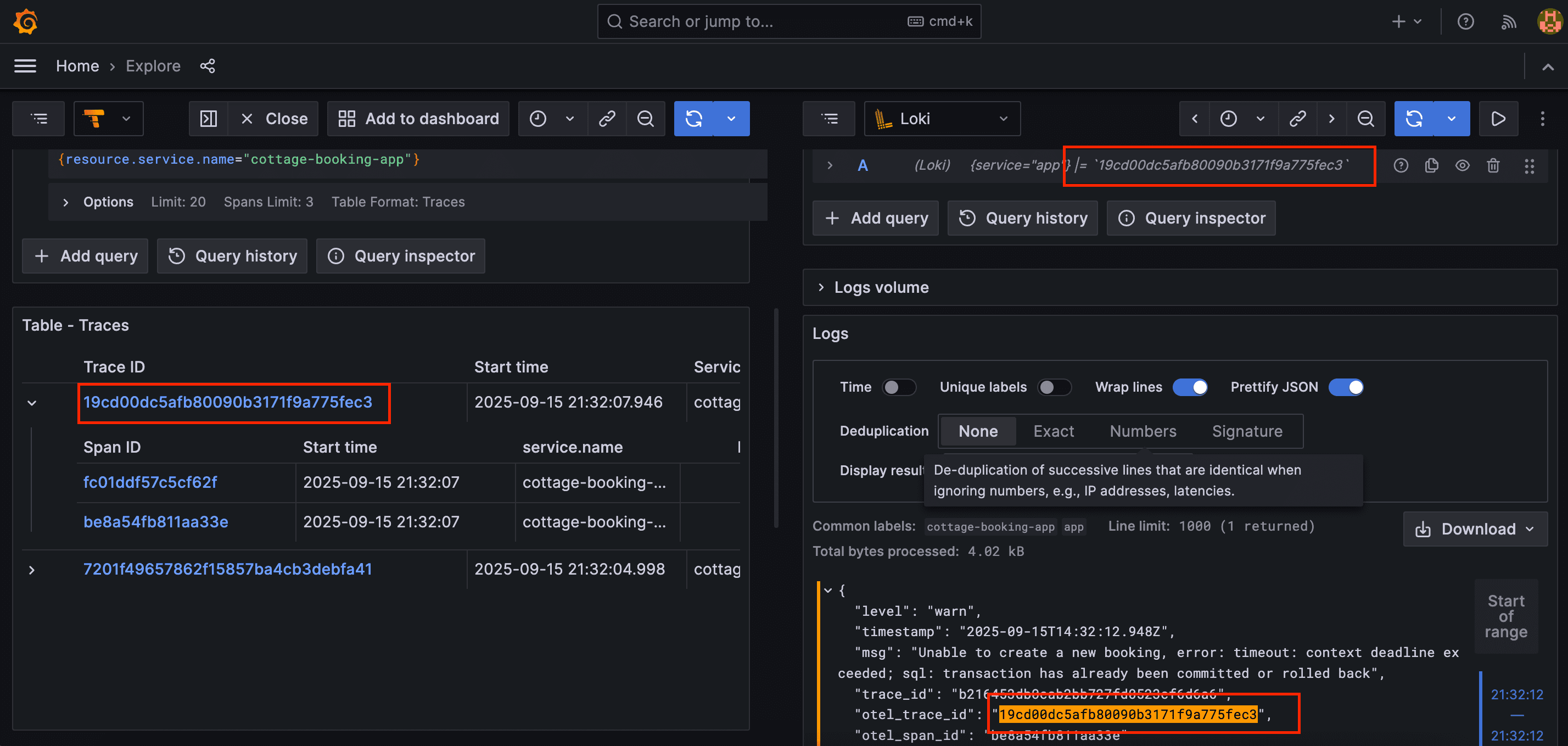
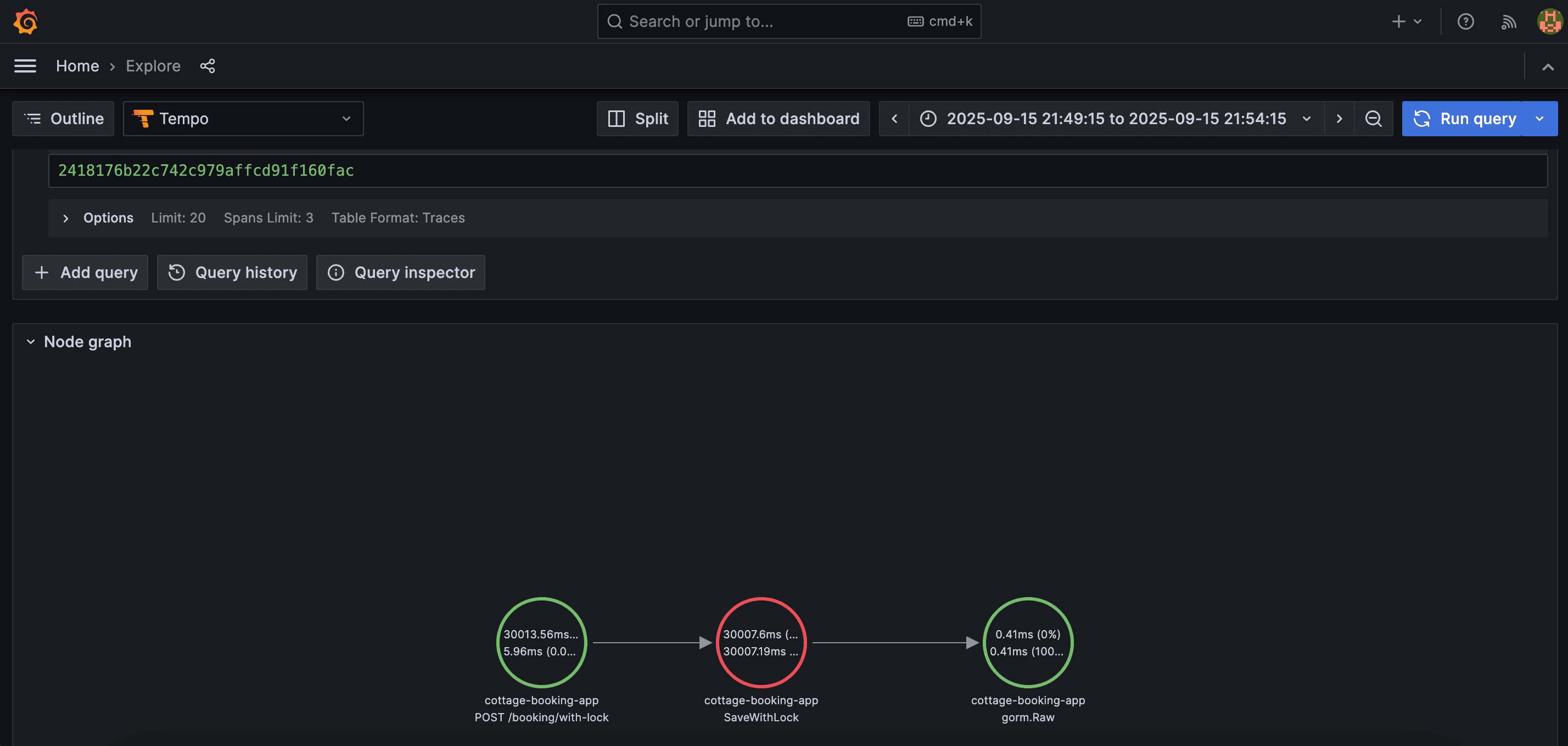
The graph view shows you the relationship between different services and operations. In my case, it was simple—just the app and the database—but you can imagine how useful this would be in a microservices setup where a request touches 10 different services.
What I learned
Tracing changes everything
Instead of guessing what went wrong, you can see the exact sequence of events. When that database lock happened, I could watch other requests pile up in real-time.
Before this experiment, I thought tracing was mostly useful for microservices. But even in a simple monolith, being able to see the timeline of a single request is incredibly valuable. You can spot slow database queries, see which functions are taking the most time, understand the flow of data through your system.
Structured logs with trace IDs
This is probably the best part. See an error in the logs? Click the trace ID and boom - you can see the entire request flow that caused it.
I used to spend so much time correlating logs. "Okay, this error happened at 14:23:47... let me search for other logs around that time... which request was this?" Now it's instant.
Metrics tell you there's a problem, traces tell you why
Metrics are great for alerting. Your request duration spikes, you get paged, you know something's wrong. But then what? You need traces to actually understand what's happening.
I set up some basic alerts in Grafana—if request duration goes above 5 seconds, send me a notification. But the real value is being able to jump from that alert straight into the traces to see what's causing it.
The setup is worth it
Three hours to set up observability might sound like a lot, but compare that to the 45 minutes of downtime we had before, plus all the time spent investigating. And now that it's set up, I have visibility into everything.
I've started adding observability to all my side projects now. It's become part of my default setup, right alongside the database and the web server.
Gotchas and things I'd do differently
Context propagation is tricky
If you're not careful, trace context doesn't get passed between functions, and you end up with disconnected traces. I had to go back and add context parameters to a bunch of functions.
The OpenTelemetry SDK tries to help with this, but you still need to be intentional about passing context around.
Too many metrics is overwhelming
I initially tracked everything. Every database query, every function call, every HTTP request. The dashboards became useless because there was too much noise.
Now I'm more selective. I track the things that actually matter: request duration, error rates, database connection pool usage, and a few business metrics like bookings per hour.
Sampling is important for production
In my test app, I'm tracing 100% of requests. That's fine for a few requests per second, but in production, you'd want to sample. Maybe trace 1% of successful requests and 100% of errors.
Otherwise, you'll drown in data and your observability stack will cost more than your actual app.
Was it worth it?
Observability isn't just about fixing bugs. It's about actually understanding what your system is doing. Once you have it set up properly, debugging becomes way less painful.
I've started using it for more than just debugging, too. I can see usage patterns—which features are actually being used, when traffic spikes happen, how long different operations take. It's changed how I think about performance optimization. Instead of guessing which parts of the code are slow, I can just look at the traces.
The other day, I noticed a particular database query was taking 2-3 seconds. Wouldn't have caught that without observability. Added an index, and it dropped to 50ms. That kind of optimization used to require a profiler and a lot of manual work.
Definitely worth the setup time. I'm never going back to grep-ing raw text logs.
If you're thinking about adding observability to your projects, start small. Pick one service, add basic tracing, and see what you learn. You don't need to instrument everything on day one. Just start somewhere and build from there.